
 Close
Close


Almost every UK business now runs on Microsoft 365. Email, files, Teams, SharePoint and user identities all live in one connected platform. That convenience is exactly why Microsoft 365 has become one of the most attacked environments in the world: a single compromised login can expose years of email, client records and financial data in minutes.
The reassuring part is that the vast majority of Microsoft 365 breaches are preventable. They rarely happen because Microsoft was “hacked” – they happen because security features that ship with the platform were never switched on, or were left on their weak default settings. This guide explains, in plain English, how to secure Microsoft 365 and how each step maps directly to UK compliance obligations such as the UK GDPR and Cyber Essentials.
Whether you are a five-person firm or a growing company with a hundred staff, the principles are the same. The goal is not to make Microsoft 365 harder to use – it is to make it far harder to abuse.
Why Microsoft 365 is a top target for attackers
Attackers follow the users, and the users are on Microsoft 365. Its scale makes it worth building automated attacks against, and because so many organisations use the same platform, one successful technique can be reused thousands of times. The most common entry point is stolen credentials: an employee is tricked by a phishing email, enters their password on a convincing fake login page, and the attacker walks straight in.
From there, the damage escalates quickly. Business email compromise – where a criminal quietly monitors a mailbox and then sends a convincing fake invoice or payment request – costs UK businesses many millions every year. Because the attacker is using a real, legitimate account, traditional defences often never notice anything is wrong. This is why identity, not just anti-virus, is now the front line of security.
Picture a typical incident: a finance manager receives an email that looks like it is from Microsoft, asking them to “re-verify” their account. They log in on a fake page. Within an hour, the attacker sets up a hidden inbox rule, watches for an invoice conversation, and emails the client new bank details. The money is gone before anyone realises the account was ever compromised. Every step of that attack is preventable with the controls below.
The Microsoft 365 shared responsibility model
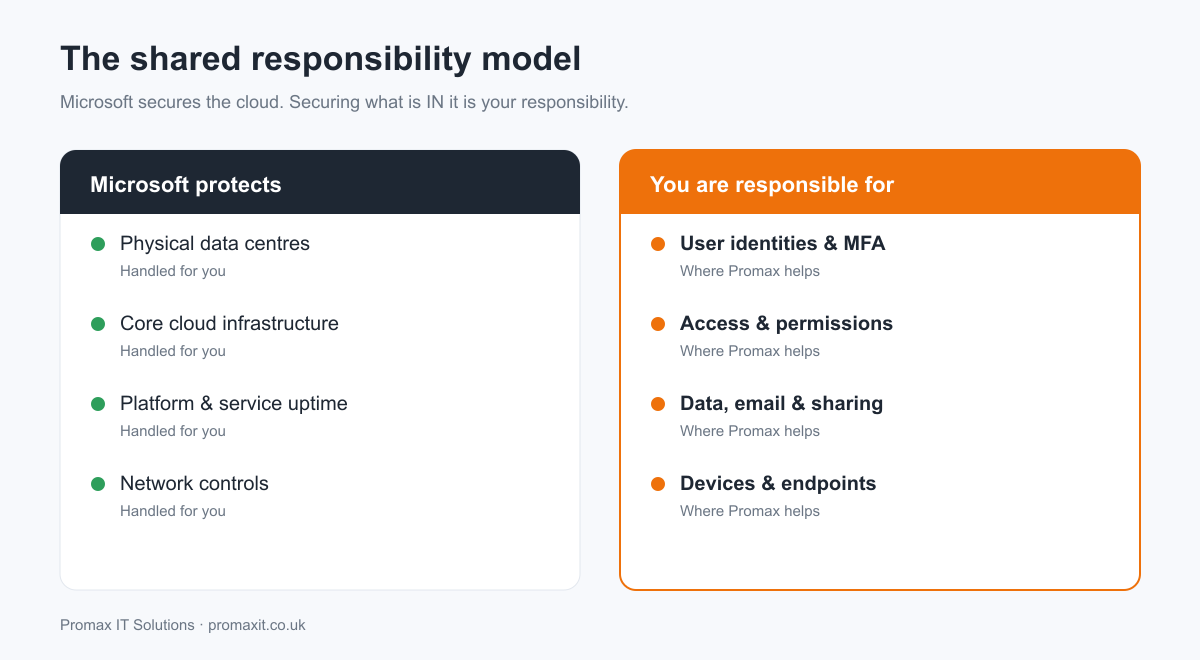
One of the biggest misconceptions is that “it’s in the cloud, so Microsoft handles security.” Microsoft secures the underlying platform – the data centres, the infrastructure and service availability. But you remain responsible for what happens inside your tenant: your user accounts, who can access what, how data is shared, and which devices are allowed to connect. Compliance frameworks hold your business accountable for that half, which is where the real work – and the real risk – lies.
Six controls that secure Microsoft 365
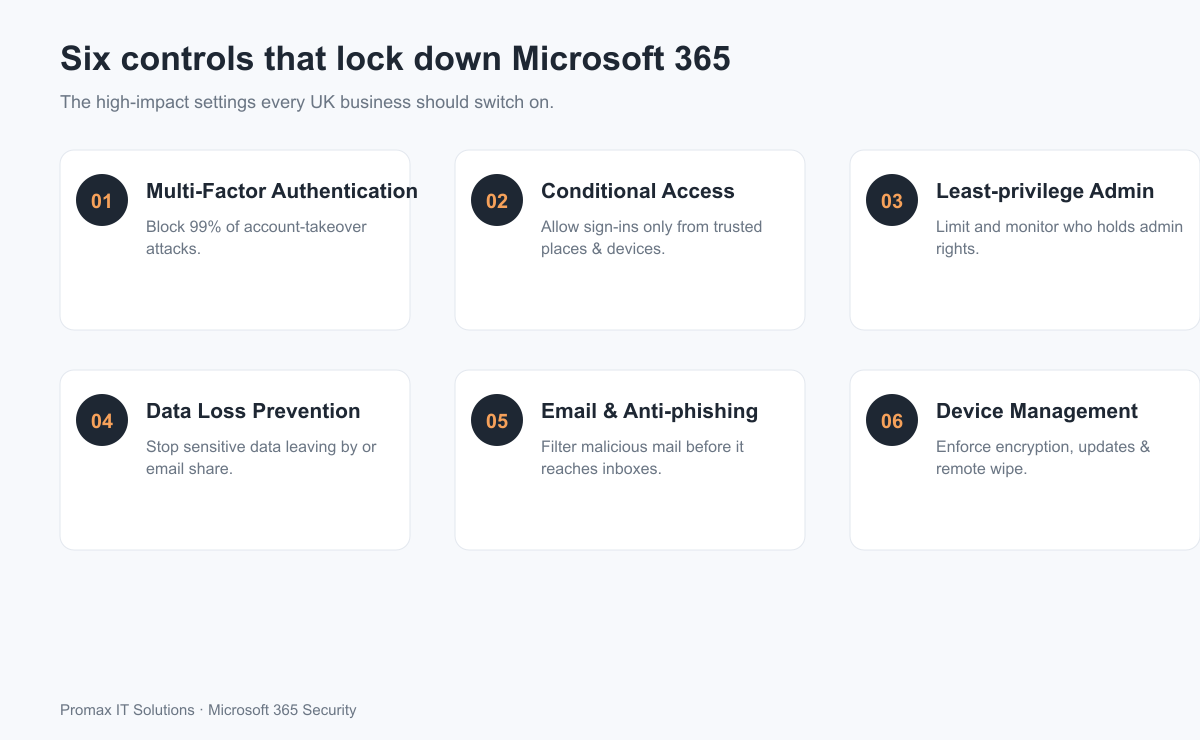
You do not need an enterprise budget to dramatically reduce your risk. These six controls deliver the greatest protection for the least effort, and together they form the backbone of a compliant Microsoft 365 environment.
1. Multi-Factor Authentication (MFA)
MFA requires a second proof of identity – usually an approval on a phone app – on top of the password. Microsoft’s own research shows it blocks over 99% of account-takeover attacks. If you do only one thing on this list, enforce MFA for every user, including senior staff and administrators, who are the most targeted of all.
2. Conditional Access
Conditional Access lets you set rules for when and where sign-ins are allowed – for example, blocking logins from countries you never operate in, requiring a managed device, or challenging risky sign-ins with extra checks. It turns a simple password check into an intelligent, risk-aware gatekeeper that adapts to the threat.
3. Least-privilege administration
Global administrator accounts are the keys to the kingdom, so the fewer that exist, the better. Give people only the access they genuinely need, use separate accounts for admin tasks rather than everyday email, and review those rights regularly. This single habit limits the blast radius if an account is ever compromised.
4. Data Loss Prevention (DLP)
DLP policies automatically detect and stop sensitive information – card numbers, personal data, confidential documents – from being emailed or shared outside your organisation. It is one of the most direct ways to demonstrate you are actively protecting personal data under the UK GDPR, and it quietly prevents honest mistakes as well as malicious leaks.
5. Email and anti-phishing protection
Since email is the number-one attack route, advanced filtering that catches phishing, spoofing and malicious links before they reach the inbox is essential. Pair it with a searchable, compliant email archiving solution so nothing important is ever lost and you can respond to legal or regulatory requests with confidence.
6. Device and endpoint management
Data is only as safe as the laptops and phones that access it. Enforcing encryption, screen locks, automatic updates and the ability to remotely wipe a lost or stolen device keeps your data protected wherever your team works. Strong endpoint protection completes the picture by stopping malware at the device itself.
Microsoft 365 does not back up your data
Here is the point that surprises most business owners: Microsoft is responsible for keeping the service running, but it is not a backup of your data. If a mailbox is deleted, a file is encrypted by ransomware, or an employee wipes a SharePoint site – accidentally or deliberately – Microsoft’s standard retention will only get you so far, and often not far enough.
A dedicated backup solution for Microsoft 365 gives you independent, recoverable copies of your email, files and SharePoint data. It is a small investment that turns a potential disaster into a minor inconvenience, and it is increasingly expected as part of a mature compliance posture.
How Microsoft 365 security maps to UK compliance
Switching these controls on is not just good practice – it directly supports the standards UK businesses are measured against.
UK GDPR
The UK GDPR requires “appropriate technical and organisational measures” to protect personal data. MFA, DLP, access control and device encryption are exactly the kind of measures regulators expect to see, and they help you respond quickly and honestly if an incident ever occurs. If you cannot show you took reasonable steps, a breach becomes far more serious.
Cyber Essentials
The UK Government’s Cyber Essentials scheme covers access control, malware protection, secure configuration and update management – all of which apply directly to your Microsoft 365 tenant. Getting Microsoft 365 right is a major step towards certification, and towards the contracts that increasingly demand it.
ISO 27001
For organisations pursuing ISO 27001, a well-configured Microsoft 365 environment provides clear, documented evidence for many controls around identity, access and information handling, making the wider certification far less painful and far quicker to achieve.
Common Microsoft 365 security mistakes
- Leaving MFA optional, or excluding “busy” senior staff from it
- Too many global administrators, with admin rights on everyday accounts
- Default sharing settings that let files be shared with anyone, anywhere
- No Data Loss Prevention, so personal data can leave unnoticed
- Assuming Microsoft backs up your data (it does not)
- Never reviewing access when staff change roles or leave
Your quick Microsoft 365 security checklist
- Enforce MFA for every user, no exceptions
- Turn on Conditional Access rules for risky sign-ins
- Reduce global admins and use separate admin accounts
- Enable Data Loss Prevention for personal and financial data
- Switch on advanced anti-phishing and safe-links protection
- Manage and encrypt all devices that access company data
- Review sharing settings on SharePoint and OneDrive
- Back up your Microsoft 365 data with a dedicated backup solution
Microsoft secures the platform. Securing what is inside it – and proving it – is your responsibility, and your compliance depends on it.
Frequently asked questions
Does Microsoft 365 come secure by default?
Not fully. Microsoft 365 includes powerful security tools, but many of the most important protections – such as enforced MFA, Conditional Access and Data Loss Prevention – are off or set to weak defaults until you configure them. Out of the box it is functional, not hardened.
Is Microsoft 365 GDPR compliant?
Microsoft provides a platform that can be used in a UK GDPR-compliant way, with the necessary contractual terms and data protections. However, compliance also depends on how you configure access, sharing and data handling. Applying the controls in this guide is how you meet your side of the obligation.
Do I still need to back up Microsoft 365?
Yes. Microsoft keeps the service running but does not provide a full, long-term backup of your data. A dedicated backup solution protects you against accidental deletion, ransomware and departing staff.
What is the single most important Microsoft 365 security setting?
Multi-Factor Authentication. It blocks the overwhelming majority of account-takeover attacks and is the highest-impact change you can make in minutes.
How often should we review our Microsoft 365 security?
At least once a year, and whenever staff join or leave or your setup changes. Many businesses build this into ongoing managed IT support so it never slips.
Get Microsoft 365 security right, without the overhead
Configuring all of this correctly – and keeping it that way as staff join and leave – takes time and expertise most small teams simply do not have. That is where we help. Our Microsoft 365 Security service reviews your tenant, closes the gaps and gives you a clear, prioritised plan, while our managed IT support keeps everything secure day to day.
Ready to see where your Microsoft 365 setup stands? Get in touch for a free Microsoft 365 Security Review and we will show you exactly what to fix first.
Leave a Reply