
 Close


Tax season is when accounting firms are busiest. It is also when criminals strike. They know your team is rushing, clients are emailing scans and nobody has time to double-check a strange request.
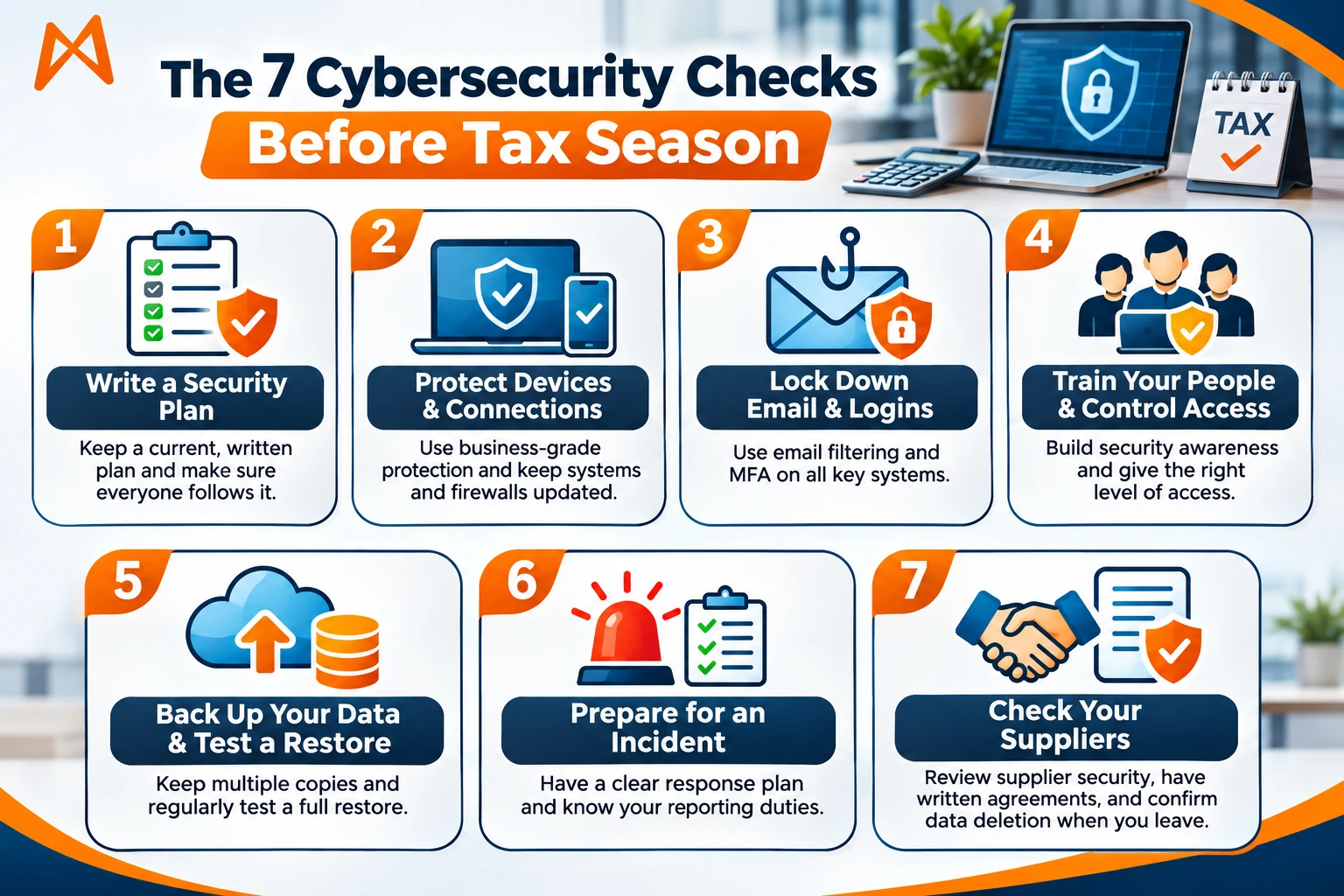
So what should an accountant check before tax season? Seven things. A written security plan, protected devices, strong email and login defences, trained staff, backups you have really restored, a tested response plan and a list of suppliers you trust. This guide walks through each one, explains the US and UK rules in plain English and gives you a timeline to finish before the rush.
- Tax season squeezes heavy workloads, new staff and attackers into a few weeks.
- In the US, the IRS says federal law means every tax and accounting practice needs a Written Information Security Plan.
- US firms must use MFA on every system that holds client data, unless a written, equally secure control is approved.
- UK firms must report a breach that puts people at risk to the ICO within 72 hours where feasible.
- A backup counts only after you have restored from it and timed the result.
- Pick a change-freeze date. Fix problems before it, not in the middle of the rush.
Why tax season raises the risk
Weak spots you can live with in October become painful in the busy weeks. Every preparer is logged in at once. Seasonal staff start work in a hurry. Clients email passports, payslips and bank statements. And attackers send fake “new client” and fake tax authority emails, hoping a tired person clicks.
The IT side matters just as much as the security side. A slow server, a dropped internet line or a laptop that will not connect costs billable hours. Say ten people lose four hours on a busy afternoon. That is 40 working hours gone, and the deadline does not move.
The damage goes beyond downtime. Accounting firms hold names, addresses, income details and bank accounts. A ransomware attack can lock you out of client files, and a stolen login can let a thief act in your name. That is why the checks below focus on the basics that stop most attacks.
Which rules apply to you?
Your rules depend on where you and your clients are. Many firms serve both countries, so here is the short version.
| United States | United Kingdom | |
|---|---|---|
| Main filing date | 15 April 2027 for individual returns | 31 January 2027 for online Self Assessment returns and payment |
| Written plan | The IRS says federal law means you need a Written Information Security Plan. Its Publication 5708 is a template for smaller practices. | UK GDPR requires appropriate security for personal data. A written plan is the best way to show it. |
| MFA | The FTC Safeguards Rule requires MFA on any system that holds client data, unless a written, equally secure control is approved. | Not named in UK GDPR, but expected as basic security. Cyber Essentials requires it on cloud services that offer it. |
| Breach reporting | If an event affects 500 or more consumers, tell the FTC within 30 days of finding out. | Report to the ICO as soon as possible, and where feasible within 72 hours, if people are likely to be at risk. |
A small-firm exemption exists in the US Safeguards Rule for some written requirements, but it does not cover MFA. Rules also change, so check current guidance and take legal advice for your case. UK firms that want a recognised baseline should read our Cyber Essentials certification guide.
The 7 cybersecurity checks before tax season
1Write down your security plan
A plan only helps if it is written, current and followed. It should name who is in charge of security, list the systems and suppliers that touch client data, and describe how you control access, protect data and back it up. It should also say what you do when something goes wrong.
In the US this is the Written Information Security Plan. In the UK, call it your security policy. A document downloaded years ago and never read is not a plan. Review it at least once a year, and ask every team member to read it.
- Is our plan dated in the last 12 months?
- Who is named as responsible for security?
- Have all staff read it?
2Protect every device and every connection
Every laptop, desktop and server holding client data gives attackers a possible way in. Business-grade protection should run on all of them, including the laptops used from home. Consumer antivirus is not enough. You want protection that spots ransomware behaviour and sends alerts to someone who acts on them. Our endpoint protection service does exactly this.
Then check the edges. Microsoft ended support for Windows 10 on 14 October 2025, so any machine still on it is either on paid extended updates or going unpatched. Your firewall or VPN gateway also needs its latest updates, because attackers target remote access gateways. A managed firewall keeps that job off your plate. Keep client finance systems separate from general office systems on the network, so a problem in one area does not spread. Good network design makes that separation simple.
- Is protection running on every device, including home laptops?
- Does any machine still run Windows 10 without paid updates?
- When did we last update our firewall?
3Lock down email and logins
Email is where most attacks begin. Think of a fake tax notice, a client asking to change bank details, or an invoice from a supplier you really use. Advanced email filtering catches many of these. Impersonation protection can also shield the people who approve payments.
Then add MFA to email, your practice software and every client portal. A stolen password alone then stops being enough. Use passkeys or authenticator apps where you can.
- Is MFA on for every mailbox and every system with client data?
- Would we spot a fake bank-detail change request?
- Who approves payments, and do we check by phone first?
4Train your people and control access
Training counts as a real security control, and the US FTC rule asks for it. Your team should know how to spot phishing, what to do with a lost device and where to report a suspicious email. Keep short training records you can show on request. Short, regular sessions work better than one long annual one.
Access matters just as much. Give people only what their role needs. Seasonal staff and interns are a special case: give each one a personal login, turn on MFA, use a firm laptop where possible and give the account an expiry date from day one. When someone leaves, remove their access the same day.
- Has everyone had security training this year, and can we prove it?
- Do seasonal staff get their own logins with an end date?
- Can we remove a leaver from every system in one day?
5Back up your data and time a restore
Backups fail quietly. The only proof is a test. Before the season, pick one client folder and your main accounting data, restore both onto a spare computer, open a file and record the time. If the answer is longer than a working day, you have found your next project.
Aim for three copies of your data, held on two different types of storage, with one copy away from the office. Make at least one copy unchangeable, so ransomware cannot delete it. Do not rely on Microsoft 365 alone. Microsoft’s own guidance says deleted email in Exchange Online stays recoverable for 14 days by default, and an admin can stretch that to 30. That is a recycle bin, not a backup. Our email archiving service keeps searchable copies of client email for exactly this reason.
- When did we last restore from backup, and how long did it take?
- Is one copy stored away from the office and protected from deletion?
- Could we recover an email deleted two months ago?
6Prepare for the day something goes wrong
An attack contained quickly is a bad morning. One that drags on can threaten the whole firm. The difference is usually preparation. Write a short response plan that lists your IT provider, your insurer and your legal adviser, and keep the phone numbers somewhere that does not depend on your own network.
Know your reporting duties before you need them. UK firms report to the ICO within 72 hours where feasible, if people are likely to be at risk. US firms must tell the FTC about events affecting 500 or more consumers within 30 days. Many states have their own rules too. Draft client notification wording in advance, and have a lawyer review it. Our ransomware recovery case study shows how a planned response works in practice.
- Do we have a written response plan with phone numbers?
- Do we know which breach rules apply to us?
- Do we know who to call at our insurer?
7Check the suppliers that hold your clients’ data
If your tax software, payroll system, practice management tool or document portal is breached, your clients will call you, not the supplier. Keep a list of every supplier with access to client data. Ask for proof of their security, such as an independent audit report like SOC 2 or ISO 27001. Put your expectations in a written agreement. When you stop using a supplier, confirm in writing that your data was deleted.
- Do we have a full list of suppliers with client data?
- Do we have a written agreement with each one?
- Did we confirm deletion the last time we left a supplier?
The 2-minute scorecard
Tick every statement that is true for your firm today.
- We have a written security plan dated in the last 12 months.
- Business-grade protection runs on every device, including home laptops.
- No machine runs software that is out of support.
- MFA is on for email, practice software and client portals.
- Everyone has had security training this year, and we keep records.
- Seasonal staff get personal logins with an end date.
- We have restored from backup and timed it.
- We have a written response plan with contact numbers.
- We know which breach reporting rules apply to us.
- We keep a list of suppliers that hold client data.
Your countdown to tax season
Work backwards from your busiest date. Pick a change-freeze date a few weeks before the rush. Anything unfinished by then waits until the season is over. A small job in November becomes a lost weekend in March.
Step 1: eight to ten weeks before
- Pick your freeze date and tell the whole team
- Replace or update unsupported computers and firewalls
- Review your security plan and your supplier list
Step 2: six weeks before
- Run the timed backup restore
- Turn on MFA everywhere it is missing
- Run short training on phishing and fake requests
Step 3: four weeks before
- Set up seasonal staff with personal logins and end dates
- Check who can reach what, and remove access nobody needs
- Test remote access for everyone who works from home
Step 4: during the rush
- Change nothing big. Fix only what blocks work
- Check your support cover for evenings and weekends
- Report odd emails or slow systems straight away
Step 5: the week after
- Hold a 30-minute review of every outage, slowdown and lockout
- Switch off any seasonal accounts that did not expire
- Turn the list into next year’s plan
Many firms find that a slow system is not just annoying. It can hide a problem. Without a baseline for normal speed, it is hard to tell a busy week from an attack. Note how your systems behave on a normal day.
Keep your proof in one folder
Doing the work is half of it. The other half is proving it. Create one folder, digital or paper, called Security Evidence. If a regulator, insurer or client asks, you can show it in minutes. Keep these items inside:
- Your current written security plan, with the review date
- Training records for every team member
- A list of devices, users and suppliers
- Your latest backup test results, with the time it took
- Your response plan and insurance contact details
- A short summary of recent security alerts and what was done
Do it yourself or get help?
A small firm can do many of these checks alone. Writing the plan, setting up MFA and running a training session are all within reach. But a few jobs need specialists. These include network design, endpoint protection, firewall updates, tested backups and monitoring every alert. Doing all of that, while also serving clients, is a lot.
A full-time IT team is expensive for a small firm, and security experts cost extra. That is why many accountants use a managed provider. Our managed services cover updates, protection, backups and monitoring. Our IT support team fixes problems fast when staff are stuck. If you have no IT lead, a virtual IT manager can own the plan. If you are moving systems to the cloud, our cloud computing team can help you do it safely, and our data migration service moves your files and email without losing anything. You can see how we have helped other UK businesses in our case studies.
Already have a provider but feel let down? Read the signs you have outgrown your managed IT provider. Whichever route you choose, make sure you have support at the times you really work. A provider who answers only on weekdays leaves your evening and weekend shifts uncovered. For a wider look at why basic security matters for every growing firm, read why every SME needs a smarter approach to IT security.
Not sure where your firm stands?
Book a free 30-minute call with our London team. We will check your setup against these seven points and give you a plain-English list of what to fix first.
Book a free consultationContact usFrequently asked questions
When is tax season for accountants?
It depends on where your clients are. In the UK, the online Self Assessment return and payment deadline for the 2025 to 2026 tax year is 11:59pm on 31 January 2027. In the US, the main individual filing deadline is 15 April 2027. Work back from your own date, and finish your security checks well before the rush starts.
What are the biggest cyber risks for accountants during tax season?
Phishing emails, stolen logins and ransomware. Criminals know accountants are busy, so they send fake client requests, fake tax authority notices and fake invoices. Seasonal staff, shared logins and clients emailing scanned documents add more openings.
Do accountants need a written information security plan?
In the US, the IRS says tax and accounting professionals must have a Written Information Security Plan under federal law. In the UK, UK GDPR requires appropriate security measures for personal data. A written plan is the easiest way to show you have them.
Is multi-factor authentication required for accounting firms?
In the US, the FTC Safeguards Rule requires multi-factor authentication for anyone accessing any information system, unless your Qualified Individual approves an equally secure control in writing. In the UK, UK GDPR does not name MFA, but regulators expect appropriate security, and Cyber Essentials requires MFA on cloud services that offer it. Either way, switch it on for email and every system that holds client data.
What should we do if our firm has a data breach?
Contain it, call your IT provider and follow your written plan. In the UK, if the breach is likely to put people at risk, you must tell the ICO as soon as possible and, where feasible, within 72 hours. In the US, an event affecting 500 or more consumers must be reported to the FTC within 30 days of finding out. Take legal advice on any other rules that apply to you.
How often should we test our backups?
Test a full restore before your busy season starts, and again after any big change to your systems. Time it. A backup only counts once you have restored from it and know how long it took. Many firms also repeat the test every quarter.
Does Microsoft 365 back up our email?
Not in the way many people think. Microsoft’s own guidance says deleted email in Exchange Online stays recoverable for 14 days by default, and an admin can stretch that to 30. If you need email back months later, you need a separate backup.
How do we manage seasonal staff safely?
Give each person their own login, turn on MFA, limit access to what the job needs and give the account an expiry date from day one. Use firm-owned laptops where you can. When the season ends, remove the access the same day.
Do small accounting firms need an IT provider?
Most do not need a full-time IT team, but they do need someone who can fix problems quickly and keep security up to date. A managed IT provider covers help desk support, updates, protection and backups for a monthly fee. That cost is often lower than a few lost days in peak season.
What proof of security should an accounting firm keep?
Keep one folder with your security plan, training records, a device and user list, a supplier list, backup test results and your insurance contact. If a regulator, insurer or client asks, you can show it in minutes.
Leave a Reply