
 Close


You win the site visit. Your price is right. Then the pre-qualification form has a security box to tick. It asks for your Cyber Essentials certificate. Without one, a bid can stall before anyone reads your method statement.
Are subcontractors ready for 2027 tenders? Many are not. Public sector buyers and main contractors now ask for a current Cyber Essentials certificate, and the rules got stricter in April 2026. This guide shows what buyers want, what changed, where subcontractors fail and how to get certified. The government is also offering a 75% discount until March 2027 or until the funding runs out, so timing matters.
- Public sector buyers and main contractors increasingly ask for Cyber Essentials before they award work.
- A certificate lasts 12 months, so one gained now can cover tenders into late 2027 if you renew on time.
- Since April 2026, missing MFA on cloud services or missing the 14-day patching rule is an automatic fail.
- Check the tender wording. Some buyers want Cyber Essentials Plus, and a basic certificate will not do.
- Site phones, tablets, old laptops, shared logins and personal devices are where subcontractors usually fail.
- A 75% discount is open until March 2027 or until the funding runs out.
Why buyers ask subcontractors for Cyber Essentials
Cyber Essentials is a UK scheme backed by government and run with the National Cyber Security Centre. It confirms that five basic security controls are in place. Together they block the everyday attacks that hit small firms.
Why do buyers care about a small subcontractor? Because construction supply chains are long and linked. Drawings, programmes, site access details and some personal data pass between many firms. One hacked supplier can give an attacker a way into the rest.
The public sector sets the pattern. Under Procurement Policy Note 014, central government departments, their agencies and NHS bodies must ask for Cyber Essentials or Cyber Essentials Plus when a contract involves certain data. That includes personal information such as addresses and payment details, and ICT systems that handle official-level data. Buyers must not apply it to every contract, but they do check it when the risk is there.
Main contractors then pass the same request down to their own suppliers. That is how a small groundworks, fit-out or M&E firm ends up with a Cyber Essentials question on a form.
Timing matters too. Government guidance says evidence of certification is needed before contract award, and the tender notice should say what is needed at bid stage. Some buyers also check at the pre-qualification step. You do not want to start the process after the notice is published.
What changed in Cyber Essentials in 2026
A new question set, called Danzell, applies to new assessments from 27 April 2026. It replaced the older Willow set. It is the version you will be assessed on for 2027 tenders. Here are the changes that matter most for subcontractors.
| Change | What it means for you |
|---|---|
| MFA on cloud services | MFA must be on for every cloud service that offers it. If it exists and you have not switched it on, you fail. This is true even when MFA is a paid option. |
| 14-day patching | You must install critical and high-risk updates for Windows, firewalls and apps within 14 days of release. Missing that window is an automatic fail. |
| Cloud services in scope | Cloud services must now be inside your scope. Email, file sharing and online business tools all count. |
| Tighter Plus testing | Your self-assessment answers must be final before Plus testing starts. You cannot edit them once the audit finds a problem. |
Backups are strongly recommended, but they are not a pass or fail item. They still matter. If ransomware hits a site laptop, a tested backup is what keeps the job running. Our ransomware recovery case study shows why.
Cyber Essentials or Cyber Essentials Plus?
Both levels cover the same five controls. The difference is how they are checked.
| Cyber Essentials | Cyber Essentials Plus | |
|---|---|---|
| How it is checked | Self-assessment reviewed by a certification body | The same, plus direct testing of your devices by an independent assessor |
| Typical use | Many public sector and supply chain contracts | Higher-risk work, or when a buyer wants stronger proof |
| Timing | Complete first | Book it within 90 days of the basic certificate |
| Renewal | Every 12 months | Every 12 months |
The tender decides which one you need. Read the wording closely. If it names Plus, a basic certificate may get you marked down or disqualified. If it says either, basic is the cheaper route.
Also check the name on the certificate. It covers the legal entity that supplies the work. If you bid as one company and your certificate names another, the buyer may not accept it. Plan your scope before you start, covering each site office, van, laptop, phone and cloud account that touches project data.
If you want the full background on the scheme, read our Cyber Essentials certification guide.
The 5 controls on a subcontractor’s setup
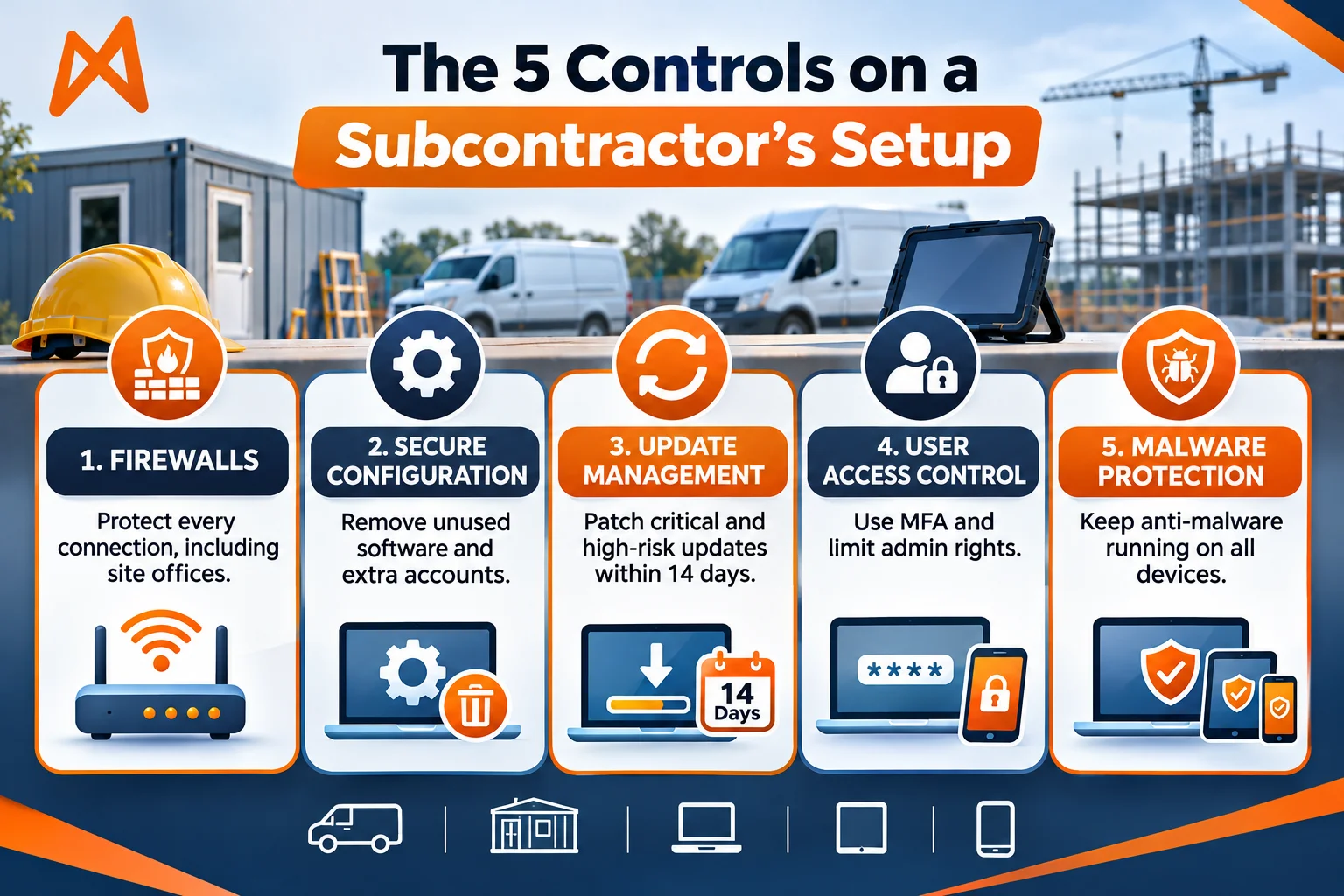
These are the same five controls every business faces. But on a subcontractor’s setup they look different. Think vans, site cabins and shared tablets.
1Firewalls: protect every connection, including site offices
Every internet connection that carries your data needs a firewall that blocks unwanted traffic. That includes the router in a temporary site cabin, not just the main office. Change default admin passwords on routers, and close anything you do not need open.
- Which routers and firewalls do our site offices use?
- Have the default passwords been changed on all of them?
- Who looks after them when a site closes or moves?
2Secure configuration: remove what you do not need
Devices should be set up safely. Remove unused software and extra accounts. Change default passwords. Shared logins on site cabin PCs are a common problem, because nobody can say who did what.
- Do site PCs share one login?
- Do old accounts from leavers still exist?
- Which laptop programs does nobody use any more?
3Security update management: patch within 14 days
This is now an automatic-fail area. Install critical and high-risk updates within 14 days of release, across all your kit. That covers laptops, phones, tablets and firewall firmware. Software that no longer gets updates must be replaced or removed.
Automatic updates cover simple setups. Once you have many devices, you need central management and a process you can show an assessor. Our endpoint protection service keeps devices patched and protected from one place.
- Who checks that every device installed the latest critical updates?
- Is any laptop stuck on old Windows to run one program?
- Are site phones and tablets still in support?
4User access control: MFA on, admin rights limited
Each person should get only the access their job needs. Limit admin rights, and do not use an admin account for daily work. Switch on MFA for every cloud service that offers it, such as Microsoft 365 or Google Workspace. Passkeys and security keys count as MFA too.
- Is MFA on for every cloud service we use?
- Who has admin rights, and do they need them?
- Can we remove a leaver’s access in one step?
5Malware protection: protect every laptop, desktop and phone
Run up-to-date anti-malware on laptops, desktops and servers, or use application allow-listing. Cover mobile devices that open work files or email too. Phones can meet the rule by installing apps only from the official app store. The goal is simple: no device that touches project data goes unprotected.
- Is protection running on every laptop and PC, and is it up to date?
- Do phones that open work email have protection?
- Would we notice if a protection tool switched itself off?
Where subcontractors trip up
It is rarely the head office that causes the problem. It is the edges of the business. These are the issues we see again and again:
- Site phones and tablets. Out of support, unmanaged or never updated.
- Personal devices. A phone that opens work email is in play, so it needs a rule.
- Old laptops kept for one program. A dated estimating or accounts tool that only runs on Windows versions that no longer get updates.
- Temporary site connections. A cabin router still on its factory password.
- Shared logins. One login for a whole site cabin PC.
- Admin accounts used every day. Convenient, and risky.
- Vague scope. A firm with several site offices and vans has a much wider boundary than a single-office firm. A wrong scope can get the submission rejected.
- Missing MFA on one cloud service. Since April 2026, one gap is enough to fail.
These problems are common, and each one can be fixed. Finding them yourself is far cheaper than having an assessor find them. Many of these gaps come from having no IT lead at all. A virtual IT manager can own the plan for you.
The 2-minute readiness check
Tick every statement that is true for your business. Each one you cannot tick is a gap to fix before you apply.
- We know every company device that touches project data, including vans and site cabins.
- MFA is on for every cloud service that offers it.
- Critical updates install within 14 days on laptops, phones and tablets.
- No device runs software that is out of support.
- Every person has their own login, and daily work does not use an admin account.
- Default passwords are changed on all routers and firewalls, including site ones.
- Protection is running and up to date on every laptop, PC and phone.
- We have a rule for personal devices that open work email.
- Our company name on the bid matches the name that will be on the certificate.
- Someone owns renewal and the date is in the diary.
Cost and funding for Cyber Essentials in 2027
Cyber Essentials prices start from about £320 plus VAT for the smallest businesses, and rise with company size. Cyber Essentials Plus costs more because an assessor tests your devices. Replacing old kit is a separate cost.
There is good news for now. The government is offering a 75% discount for eligible micro, small and medium-sized businesses. That brings the price down to between £80 and £125 plus VAT.
- It is open to businesses that have not been certified in the last four years.
- It runs until March 2027, or until the funding runs out.
- Places go to the first businesses that apply, so do not wait.
- You apply through the IASME Cyber Essentials First Step Fund.
Some suppliers in the supply chains of organisations that have signed the Cyber Resilience Pledge can also get a fully funded certificate. If a main contractor has asked you for Cyber Essentials, ask them whether that route applies to you.
Check your eligibility before you rely on the discount, because the rules can change. And remember, the saving only helps if your setup passes. Fix the gaps first.
How to get ready for Cyber Essentials in 5 steps
Step 1: set your scope
- List every site office, van, laptop, PC, phone, tablet and cloud account that touches company data
- Confirm the legal entity that will hold the certificate
Step 2: run a gap check
- Compare your kit, logins and configuration with the five controls
- Pay extra attention to MFA, 14-day patching and unsupported software
Step 3: fix the gaps
- Roll out MFA on every cloud service
- Bring devices under central management
- Replace or retire unsupported kit and tidy up admin access
Step 4: submit and certify
- Complete the self-assessment honestly
- Book Cyber Essentials Plus within 90 days if the tender needs it
Step 5: plan for renewal
- Diary the renewal date and start about two months early
- Keep updates, MFA and device lists under review all year
Moving files and apps to the cloud can make several of these steps easier, because you manage access in one place. Our cloud computing team can help you decide what to move.
Do it yourself or get help?
A single office with simple IT can often manage the self-assessment alone. Get help if you run several sites, vans or shared tablets, or have no spare IT time. It also pays off when a tender deadline is close or the 14-day patching rule worries you.
A good partner does more than complete a form. They run the gap check, fix the problems, handle updates every day and stay with you at renewal. Our managed services team does exactly that. For day-to-day issues on site, our IT support team can help too. We also explain why basic security matters for every growing firm in why every SME needs a smarter approach to IT security.
Not sure if you are ready for 2027 tenders?
Book a free 30-minute call with our London team. We will look at your setup, show you the gaps and give you a plain-English plan to get certified.
Book a free consultationContact usFrequently asked questions
Do subcontractors need Cyber Essentials for 2027 tenders?
It depends on the tender, so read the notice early. Central government and NHS buyers must ask for it on contracts that involve certain data, such as personal information, under Procurement Policy Note 014. Main contractors often pass the same rule down to their supply chain. If you bid on public sector or main contractor work, plan to hold a current certificate.
Should a subcontractor get Cyber Essentials or Cyber Essentials Plus?
Follow the tender wording. Cyber Essentials is a self-assessment that a certification body checks. Cyber Essentials Plus checks the same five controls, then an independent assessor tests your devices directly. Government guidance says buyers can ask for either level, and Plus is meant for higher-risk work. If the tender names Plus, a basic certificate will not do.
What changed in Cyber Essentials in 2026?
A new question set called Danzell applies to new assessments from 27 April 2026. Multi-factor authentication is now required on every cloud service that offers it, and missing it is an automatic fail. Critical and high-risk updates must be installed within 14 days, and missing that is also an automatic fail. Cloud services must now sit inside your scope.
How long does a Cyber Essentials certificate last?
A certificate lasts 12 months. You then renew it. Put the renewal date in your diary and start about two months early. That way an expired certificate cannot hold up a live tender.
How much does Cyber Essentials cost for a small subcontractor?
Prices start from about £320 plus VAT for the smallest businesses and rise with company size. Cyber Essentials Plus costs more because an assessor tests your devices. Fixing gaps, such as replacing old laptops, is a separate cost.
Is there funding for Cyber Essentials?
Yes, for now. The government is offering eligible micro, small and medium-sized businesses a 75% discount, so a certificate can cost between £80 and £125 plus VAT. It is open to businesses not certified in the last four years. It runs until March 2027 or until the funding runs out, and places are given to the first businesses that apply. Some suppliers in the supply chains of organisations that signed the Cyber Resilience Pledge can also get a fully funded certificate.
Are phones, tablets and personal devices included?
Yes, when they connect to your company data. Phones and tablets you use on site need updates and must still be in support. Personal devices that open work email need thought too. Many firms fix this by managing devices centrally or by limiting what personal devices can reach.
Can I bid before I have the certificate?
Sometimes. Under government guidance, evidence of certification is required before contract award, and the tender notice should say what is needed at bid stage. A few buyers allow a risk-based start while a certificate is being renewed. Never assume. Ask the buyer early and keep proof of your progress.
How long does it take to get certified?
If your setup is in good shape, the self-assessment can take days. Fixing gaps takes longer. Turning on MFA, replacing unsupported devices and tidying admin accounts are the usual jobs. Start at least two months before the tender deadline. You must finish Cyber Essentials Plus within 90 days of the basic certificate.
How is Cyber Essentials different from ISO 27001?
They are different standards. Cyber Essentials tests five basic controls against common attacks. ISO 27001 is a broader standard for running a full information security management system. Many subcontractors start with Cyber Essentials because tenders ask for it most often.
Leave a Reply